
What Is Vue.js?
Vue.js is an open-source JavaScript framework used to build dynamic user interfaces and single-page applications. It is lightweight, flexible, and designed to be incrementally adoptable. Vue can function both as a simple UI layer and as a full-featured front-end framework capable of handling complex application logic.
To master Vue development, understanding the component lifecycle is essential.
Understanding the Vue.js Component Lifecycle
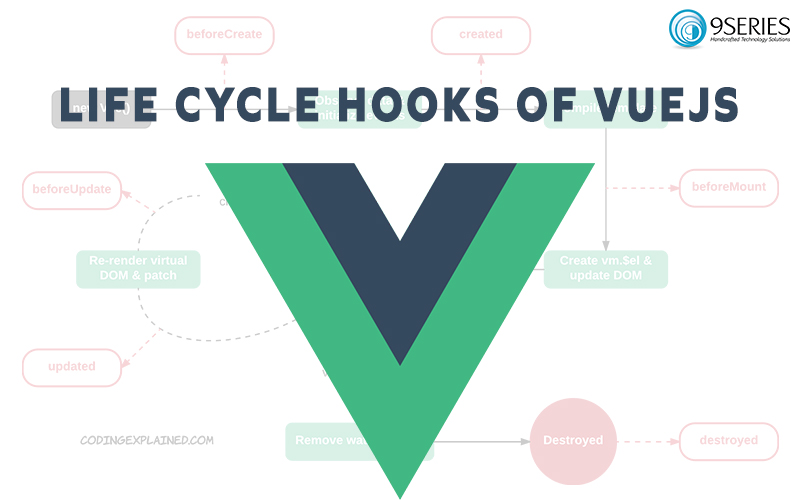
Every Vue component goes through a series of stages from creation to destruction. Lifecycle hooks allow developers to execute custom logic at specific phases of a component’s existence.
These hooks help you:
- Initialize data
- Access or modify the DOM
- Debug reactive updates
- Perform cleanup operations
Lifecycle methods are automatically bound to the component instance, meaning you can directly access component state and methods using this.
The 4 Main Categories of Vue.js Lifecycle
The Vue component lifecycle is divided into four major phases:
- Creation
- Mounting
- Updating
- Destruction
Let’s explore each phase in detail.
- Creation Phase (Initialization)
The creation phase occurs before the component is mounted to the DOM. It is mainly used for initializing data, setting up reactive properties, and configuring events.
beforeCreate()
This hook runs immediately after the Vue instance is initialized but before reactive data and events are set up.
At this stage:
- Data is not reactive
- Events are not initialized
- DOM is not accessible
It is rarely used unless you need to perform very early initialization logic.
created()
This hook runs after Vue has set up data reactivity and event handling.
At this stage:
- Reactive data is available
- Methods are accessible
- Templates are not yet mounted
- DOM is not yet rendered
The created() hook is commonly used for:
- Fetching initial data
- API calls
- Setting up watchers
- Initializing component state
For server-side rendering scenarios, created() is preferred over mounting hooks for data fetching.
- Mounting Phase (DOM Insertion)
The mounting phase occurs when the component is inserted into the DOM. This phase allows access to rendered elements.
beforeMount()
This hook runs after the template is compiled and the virtual DOM is created, but before the actual DOM is updated.
At this stage:
- $el is defined
- The component has not yet been rendered to the DOM
mounted()
This is one of the most commonly used lifecycle hooks. It runs after the component has been rendered and inserted into the DOM.
At this stage:
- Full access to DOM elements
- Reactive data is available
- Template is rendered
Typical use cases include:
- Accessing DOM elements
- Integrating third-party libraries
- Manipulating UI after render
- Running client-side only logic
Note: For server-side rendering, avoid using mounted() for initial data fetching. Use created() instead.
- Updating Phase (Re-rendering)
The updating phase occurs whenever reactive data changes and the component re-renders. These hooks are useful for debugging and responding to state changes.
Important note: Do not mutate component state inside update hooks, as it may cause infinite update loops. Use computed properties or watchers instead.
beforeUpdate()
This hook runs after reactive data changes but before the DOM is patched and re-rendered.
At this stage:
- You can access the new state
- DOM still reflects the previous state
It is useful for performing operations before the UI updates.
updated()
This hook runs after the DOM has been updated and re-rendered.
At this stage:
- DOM reflects updated data
- Safe to perform DOM-dependent operations
This hook is commonly used for:
- Debugging
- Triggering UI-based actions
- Running logic dependent on updated DOM
- Destruction Phase (Teardown)
The destruction phase occurs when a component is removed from the DOM. It is used for cleanup and resource deallocation.
beforeDestroy()
This hook runs just before the component is destroyed.
At this stage:
- Component is still functional
- Events and watchers are still active
Common use cases:
- Removing event listeners
- Clearing timers
- Canceling API calls
- Cleaning up subscriptions
destroyed()
This hook runs after the component has been destroyed.
At this stage:
- Event listeners are removed
- Directives are unbound
- Child components are destroyed
It is typically used for final cleanup or notifying external services.
Why Understanding Vue Lifecycle Matters
Understanding Vue’s lifecycle helps developers:
- Optimize performance
- Avoid memory leaks
- Debug efficiently
- Structure code properly
- Integrate third-party tools safely
It also helps you decide exactly which hook to use for specific operations, improving maintainability and scalability.
Final Thoughts
The Vue.js lifecycle provides a clear roadmap of how a component evolves from initialization to destruction. By mastering lifecycle hooks, developers can build highly optimized and reactive applications.
If you are working with modern front-end frameworks or planning scalable UI development, understanding lifecycle management is a critical skill.
For deeper learning, refer to the official documentation of Vue.js and explore advanced topics such as watchers, computed properties, and composition API.
At 9series, we specialize in modern JavaScript frameworks and scalable front-end architecture. If you are looking to build high-performance web applications using Vue or other advanced technologies, our development team can help you deliver exceptional digital experiences.